
Vitals has had eight updates since 1.8 brought the command line. Most are small, but together they fill in some real gaps:
- Docker: CPU for every container, and what Docker keeps on your disk.
- Helpers: background helpers that apps install outside themselves now show under their app.
- Links:
vitals://opens any tab, for SketchyBar and other custom menu bars. - Ukrainian: the app’s 13th language.
If you haven’t tried it yet, Vitals is an Activity Monitor alternative for Mac. It groups every process under the app it belongs to, so you see about 60 apps instead of 1,000 processes, and it keeps up to a year of history. I wrote about why I built it when it came out.
Docker: CPU per container, and disk usage
Vitals has shown your containers since 1.2: memory, CPU, network and ports for each one, inside the project it belongs to. Two things were missing.
The first was a chart for CPU. Memory had one, a band per container stacked over the last few minutes, but CPU was only a number. Now CPU has the same chart, next to it, with each container in the same colour as in the memory chart. When one container spikes, you can see which.
The second was disk usage. Docker on a Mac keeps everything in one large disk image, and it grows quietly: old images, stopped containers, volumes nothing uses, years of build cache. Finder only shows one big file. The new Disk Use card shows what is inside it:
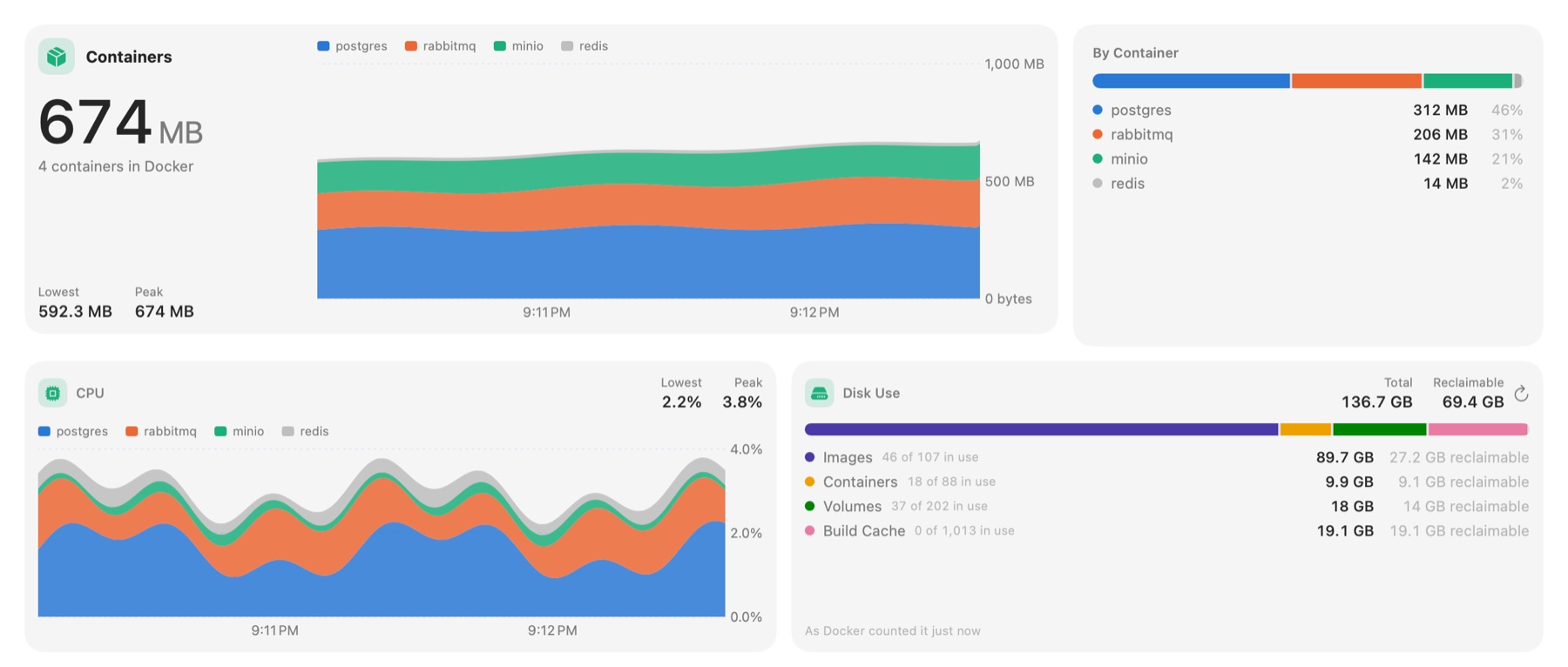
For images, containers, volumes and build cache, it shows how much each takes, how many are in use, and how much you could reclaim. The figures come from Docker itself, so they match docker system df, but you don’t need to open a terminal to get them.
Docker takes a few seconds to add this up on a big setup, so Vitals asks Docker for it when you open the tab, and again when you press Refresh. It never runs in the background.
Cleaning it up is next on the roadmap: pruning one kind at a time, from the same card. Each one will ask first and say how much it frees. Volumes hold data, so Vitals will only offer to remove the ones no container uses.
Every helper under its app
Grouping processes into apps is the main thing Vitals does, and it works by looking at where each program lives. Chrome’s dozens of helpers are all inside Google Chrome.app, so they go under Chrome.
Some apps also install helpers outside themselves, though, and those were showing up on their own, as rows like com.docker.vmnetd or com.crystalidea.macsfancontrol.smcwrite:
- Background helpers in
/Library/PrivilegedHelperTools. Docker, Adobe Creative Cloud, Charles, Macs Fan Control and Zoom all install one. - System extensions, such as the virtual cameras from OBS and other apps. macOS copies them to
/Library/SystemExtensions. - Xcode’s services: the simulators and devices, from
/Library/Developer.
On a developer’s Mac, that can be ten rows that should be part of other apps.
Since 1.8.5, Vitals finds the owner from what each helper says about itself:
- Who it answers to. A background helper lists the apps that are allowed to talk to it. Docker’s names Docker.
- Who starts it. The launchd job that starts a helper can name its app.
- Who lists it. The app itself can list the helpers it installs.
- Its name. Apple requires an extension’s identifier to start with its app’s (
com.obsproject.obs-studio.mac-camera-extensionbelongs tocom.obsproject.obs-studio).
A match only counts if the helper and the app are signed by the same developer, so nothing can hide under another app’s name. Xcode’s services go under Xcode, and Apple’s own helpers go under macOS.
So the Docker row now has vmnetd in it, and the camera extension sits under OBS. If an app still shows a helper on its own line, tell me, with the helper’s name.
Open any tab from a link, for SketchyBar
A Vitals customer runs SketchyBar, a custom menu bar driven by shell scripts. Each readout in their bar is clickable, and they wanted the CPU one to open Vitals on the CPU tab. The Open Vitals shortcut could do it, but going through Shortcuts added a delay to every click.
Since 1.8.7, every tab has a link:
open 'vitals://open?tab=cpu'
open 'vitals://open?tab=memory'
open vitals://dropdown
The tabs are overview, cpu, memory, disk, network, gpu, neuralEngine, battery, sound, bluetooth, projects, agents and containers. vitals://dropdown shows or hides the dropdown under the menu bar icon.
The other half of their question was reading the numbers, so the bar and Vitals always agree and the Mac doesn’t measure everything twice. That part was already there: the vitals command answers from the running app, and --json is made for scripts. A SketchyBar item that shows CPU and opens Vitals on click looks like this:
# sketchybarrc
sketchybar --add item cpu right \
           --set cpu update_freq=2 script="$PLUGIN_DIR/cpu.sh" \
                 click_script="open 'vitals://open?tab=cpu'"
# plugins/cpu.sh
CPU=$(vitals status --json | jq -r '.cpu.percent_of_all_cores | round')
sketchybar --set "$NAME" label="${CPU}%"The same works for memory pressure (.memory.pressure), the app using the most CPU (vitals top --by cpu --limit 1 --json), or what is left of your Claude or Codex plan (vitals limits --json). New fields get added over time, but existing ones keep their names, so a script you write today keeps working. Every command and field is on the CLI page.
The same links work from Raycast, Alfred, a Stream Deck button, or anything else that can open a URL.
Vitals in Ukrainian
Vitals 1.8.3 added Ukrainian, the 13th language. Every tab, every setting, the release notes and the website are in Ukrainian now.
As with every other language, I didn’t translate word by word. Each term uses the word macOS itself uses in Ukrainian, the same as Activity Monitor (Монітор активності) does. Vitals follows your Mac’s language. To use Ukrainian for Vitals only, add Vitals under Applications in System Settings → General → Language & Region.
Коротко українською: Vitals — альтернатива «Монітору активності» для Mac, і тепер він українською. Він групує процеси за програмами й зберігає історію до року. Кожна вкладка, кожне налаштування й увесь сайт перекладено словами самої macOS, як у «Моніторі активності». Якщо щось звучить не так, напишіть мені.
Smaller things
- Insights settings fit every language. In languages with longer labels, such as Chinese, a value like “50% of a core” in Settings → Insights was cut short. Since 1.8.6 it shows in full.
- License emails in your language. The email with your key now comes in the language of the page you bought on, in all 13 of the site’s languages.
How to get it
All of this is in Vitals 1.8.8. The update is free for everyone who owns Vitals, and Vitals offers it the next time it checks for updates. With Homebrew, Vitals updates itself, so there’s nothing to run. New to Vitals? Try it free for 3 days.
Next on the roadmap is disk: what takes your space, and cleaning it up safely, Docker included.